Prod Protect
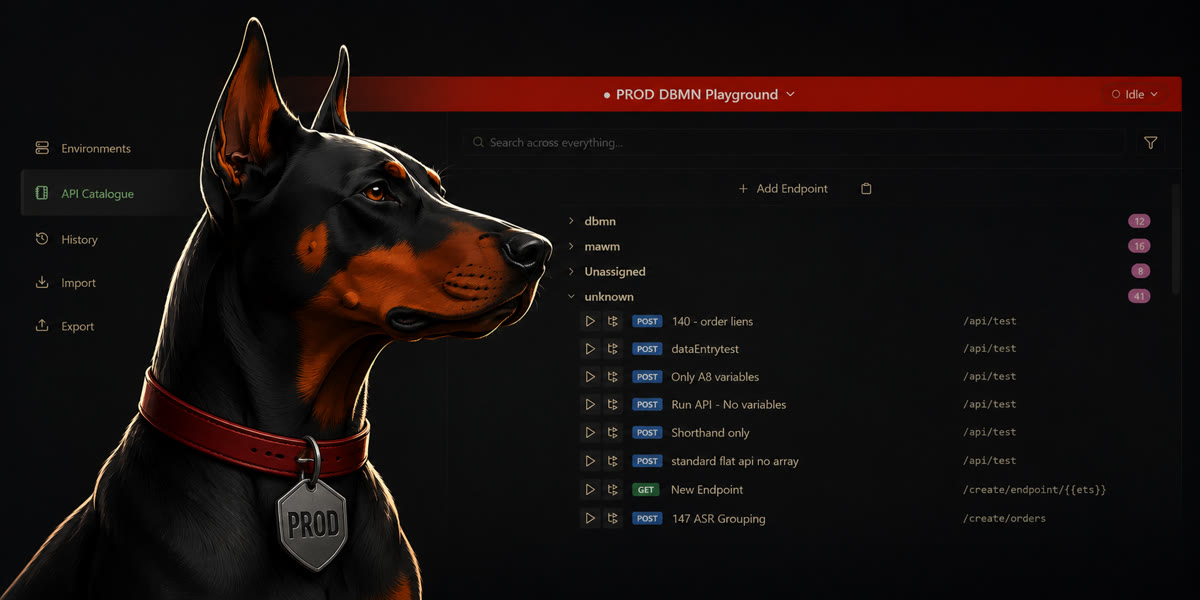
Any environment you set to type Production gets the production safeguards automatically — a red Hub header, and a confirmation before every live execution.
Those safeguards are driven by the environment’s type, which normally means anyone can turn them off by changing the type.
Prod Protect closes that. It makes an environment’s type a property of the environment itself rather than a personal preference. For environments DBMN manages for your organisation, the type is set centrally and applies to everyone connecting to that environment.
What you see on a managed environment
The Environment Type dropdown is read-only, with a note beneath it explaining why:
| Pinned to | What you see |
|---|---|
| Production | 🛡 Prod Protection enabled — and all the production safeguards are permanently on |
| Any other type | 🔒 Set by environment manager — locked, but nothing to warn about |
If DBMN has recorded who manages the environment, the note names them instead — “Prod Protection enabled by Acme IT”.
Production environments are also shown in red in the environment selector, so the risky choice stands out before you pick it, not just after.
How environments are matched
Protection follows the environment’s URL, so it’s recognised however the URL is typed — capitals, a port, a trailing slash or a path all still match.
You can’t work around it by editing
The type is applied wherever environments are saved, not just in the editor, so it survives importing a .dbmn.zip, or deleting the environment and adding it back.
It stays on. Once your extension knows an environment is protected, it stays protected across restarts, network outages, expired sessions and signing out. Protection is only lifted when DBMN withdraws it.
What it isn’t
Prod Protect is a safety net against accidents — someone changing a dropdown and losing their production warnings. It isn’t a security control and doesn’t replace access management on the environment itself.
Getting it set up
Contact DBMN and let us know which environments you want protected and what each one should be pinned to.